
DVR/NVR Can’t find the HDD
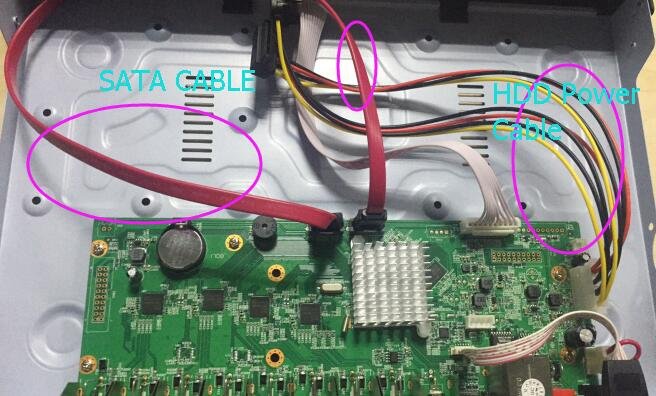
If the DVR/NVR can’t find the HDD . the reason maybe as below.
1. DVR/NVR not support connect& disconnect HDD when the power on . You must to power off , connect the HDD . Then Power ON
2. Check if the HDD already power on . if the SATA cable connect correct .
Way : When power on . put hand on to the HDD to test it the HDD working(vibrate), if no vibrate . means the HDD no power in .
Pls change the 1 cable to test it .
Also change the SATA Cable to test it .
1. DVR/NVR not support connect& disconnect HDD when the power on . You must to power off , connect the HDD . Then Power ON
2. Check if the HDD already power on . if the SATA cable connect correct .
Way : When power on . put hand on to the HDD to test it the HDD working(vibrate), if no vibrate . means the HDD no power in .
Pls change the 1 cable to test it .
Also change the SATA Cable to test it .

3. To check if the Power Adapter working or enough .
if can works in 1TB . can’t working 2TB or 3TB . change to 5A Power to test it .
4. Check if the HDD Broken or not .
5. Usually the DVR support WD (Westdigital brand) If use the other brand . It maybe not compatibility well
6. Default the DVR and upgrade it in new FW.
7. if all no working . Please contact our technician.